The Peek guide
Peek notes not showing on Apple Watch: setup and fixes
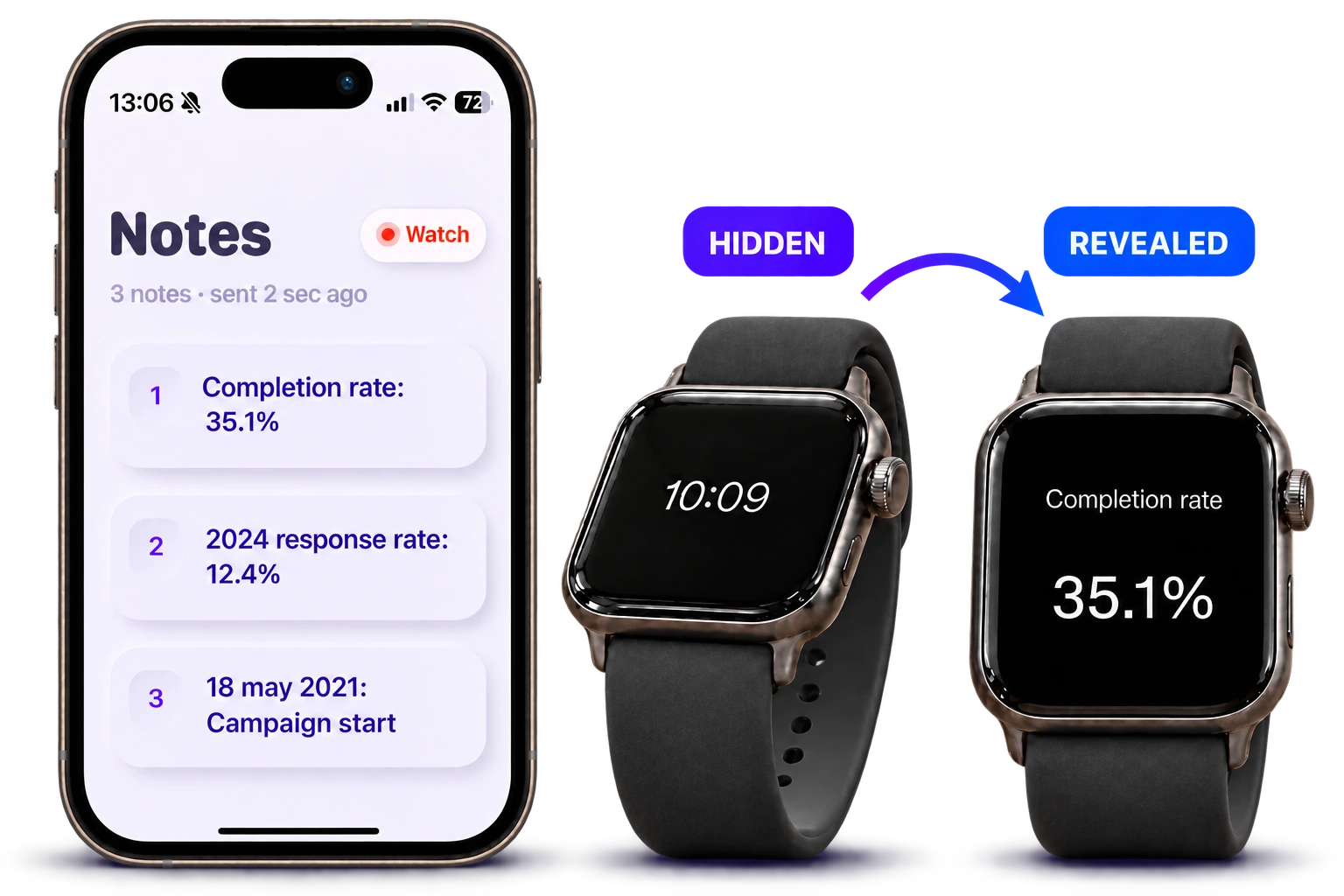
If a Peek note is missing, open Peek on the watch and tap Send to watch again on iPhone. Keep the paired devices close with Bluetooth enabled. Then double-tap the watch screen in Peek and tilt forward: a prepared note can still be hidden until you reveal it.
Check the basic setup
Peek needs an iPhone running iOS 18 or later and a paired Apple Watch running watchOS 11 or later, with Peek installed on both devices. Confirm you are opening Peek rather than Apple Notes or another notes app.
- Open Peek on iPhone and check the note you intend to send.
- Open Peek on the paired watch.
- Keep the devices close and enable Bluetooth.
- Tap Send to watch again on iPhone.
- Double-tap the watch screen, then tilt forward to reveal the note.
Check whether the note is still hidden
A tap after you double-tap the watch screen means the note is ready, but still hidden. Tilt forward to read it and level your wrist to hide it again.
If the movement is difficult to trigger, practice it before the presentation. Plus includes gesture sensitivity controls. Avoid changing several settings at once during rehearsal so you can tell what helped.
If the note still does not appear
Contact Tech Care support with your iPhone model, Apple Watch model, software versions and the step that failed. Say whether the note never appears or appears and then hides. Do not include private note contents unless needed to explain the issue.
Until transfer and reveal work reliably on your devices, use a paper or iPhone backup for an important talk. Watch memory is a Plus feature; confirm your notes and position before each session.
Questions
Is the dark screen proof the transfer failed?
No. A note may be prepared but still hidden. Try the in-app screen double-tap and tilt-to-read sequence after resending the note.
Where can I ask for help?
Use the Contact / Support link on this site. Include device models, software versions and the exact step where the expected behavior stopped.